Introducing: a Musical Mel Transform
I’m open sourcing a useful tool in our realtime audio AI toolbox here at VJLab, a Musical mel transform.
It’s written in PyTorch and can be ONNX-compatibile with a convolutional FFT (with use_conv_fft=True).
If you’ve ever wanted audio features that directly represent semitones (or quarter tones!) this is the package for you.

Why have a mel transform centered on musical notes?
In general, the mel transform has the following benefits:
- Better featurization for perceptually relevant frequencies for human ears
- Dimensionality reduction
- Some noise robustness (since mel transforms average or smooth over multiple FFT bins)
And what I’m calling a “musical” mel transform, where the mel bins are aligned to pitch centers, has additional advantages if:
- Your task is transcription or musical note related
- Your case is realtime/speed critical and care about low-end discrimination (vs say, a CQT that would do well on low frequencies but is very slow)
- You’re comparing against a completely learned filterbank, or that approach isn’t working
Personally I have found this MusicalMelTransform beats raw FFTs and standard mels for realtime usecases. The package also has an option learnable_weights="fft" to add learnable parameters to reweight the incoming FFT bins for loudness, which is important.
The default arguments convert the FFT magnitudes to power (power: int = 2) and then to a dB scale (to_db: bool = True) as well, which is common in audio AI frontend feature extraction.
TL;DR - if you’re working with music in your AI usecase, then having features that map directly to musical notes can sometimes help with performance!
How does it work?
Mel scale is just a mapping of FFT bins -> new bins. So each mel bin is just a weighted sum of the linearly-spaced FFT bins. That’s it!
This code:
- Adds some adaptive (with
adaptive=True) widening to interpolate great weighted combinations of FFT bins to make pitches discernable at pitch centers - Gives a configurable way to control the number of high frequency features (with
passthrougharguments) - Provides an optional ONNX compatible FFT operator
You can also shorten or widen your tone granulariy – so semi- or quarter- tones is just a parameter change:
| |
How does it compare to other options?
Here’s a quick comparison between:
- Traditional linearly-spaced FFT
torchaudiomel scale transform- MusicalMelTransform (this repo)
I have constrained the two mel transforms (2 & 3) to have the same dimensionality, and with f_max at 16khz to make the comparison fair:
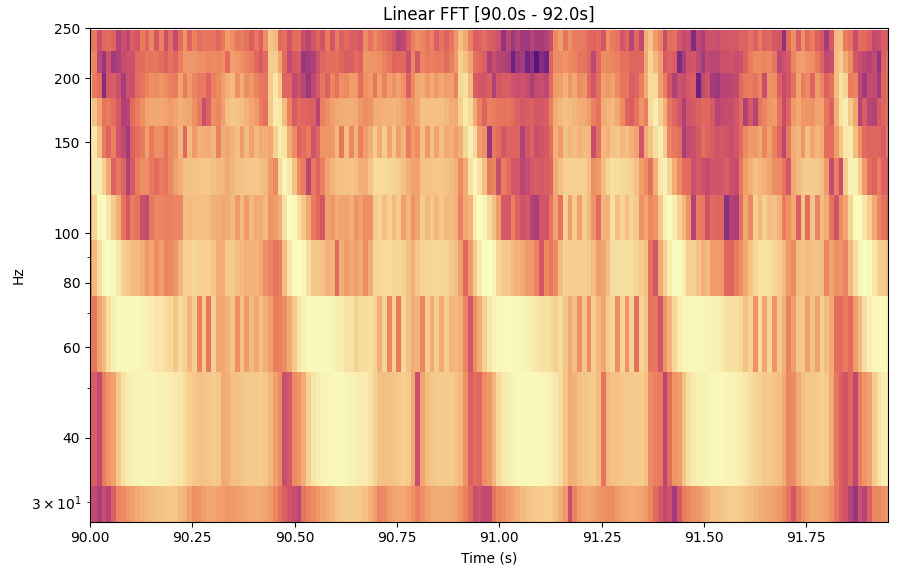
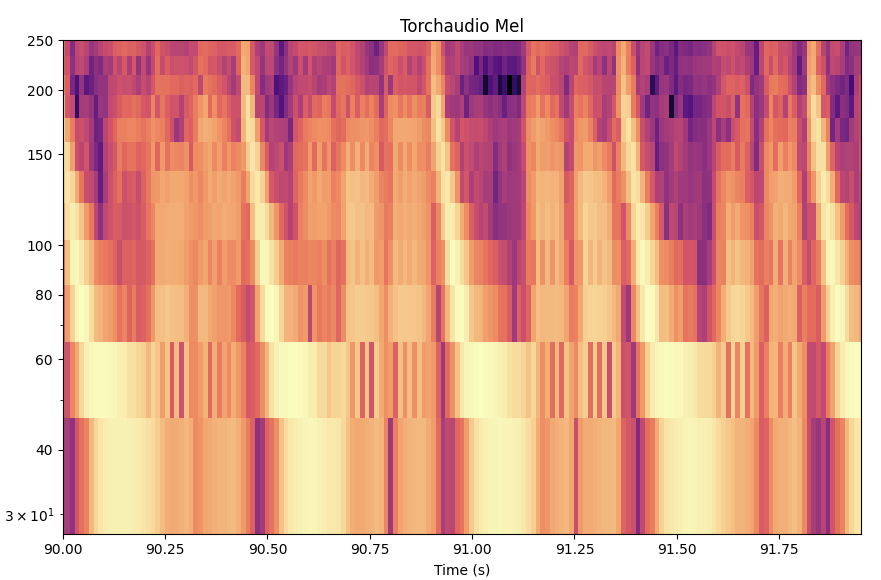
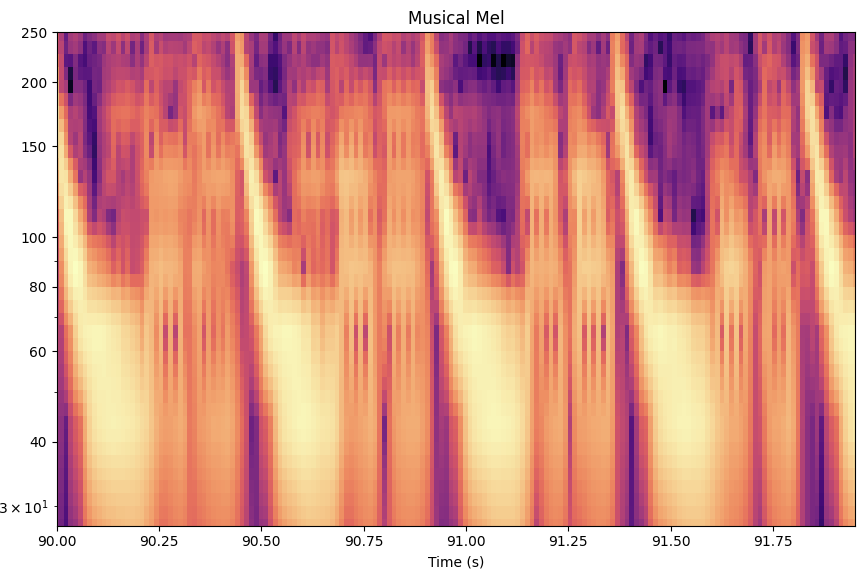
As you can see, especially in the low frequencies, the resolution of MusicalMelTransform is better. This is great for music, and especially for low-frequency heavy music like today’s pop and electronic music. The graph here shows a kick pattern, typical in house or techno music.
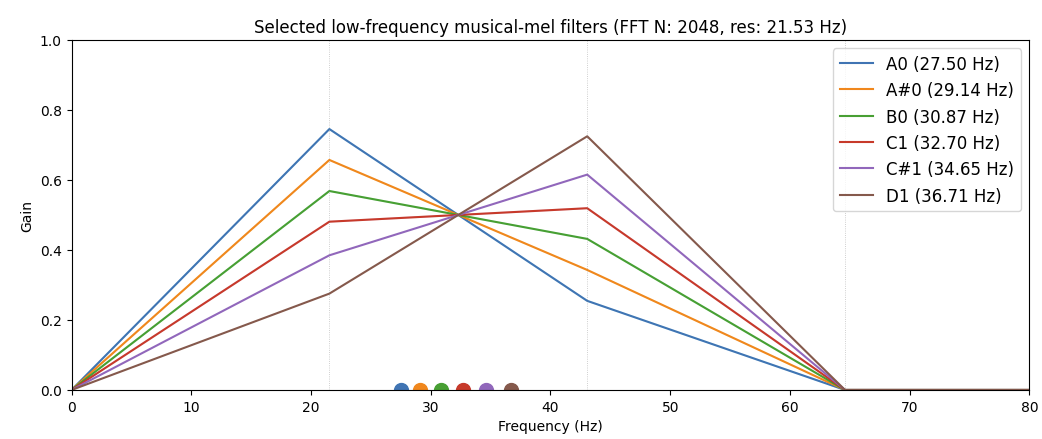
If we pick a number of low-end sub notes and plot the corresponding “filters” from the MusicalMelTransform you can see how this works more concretely:
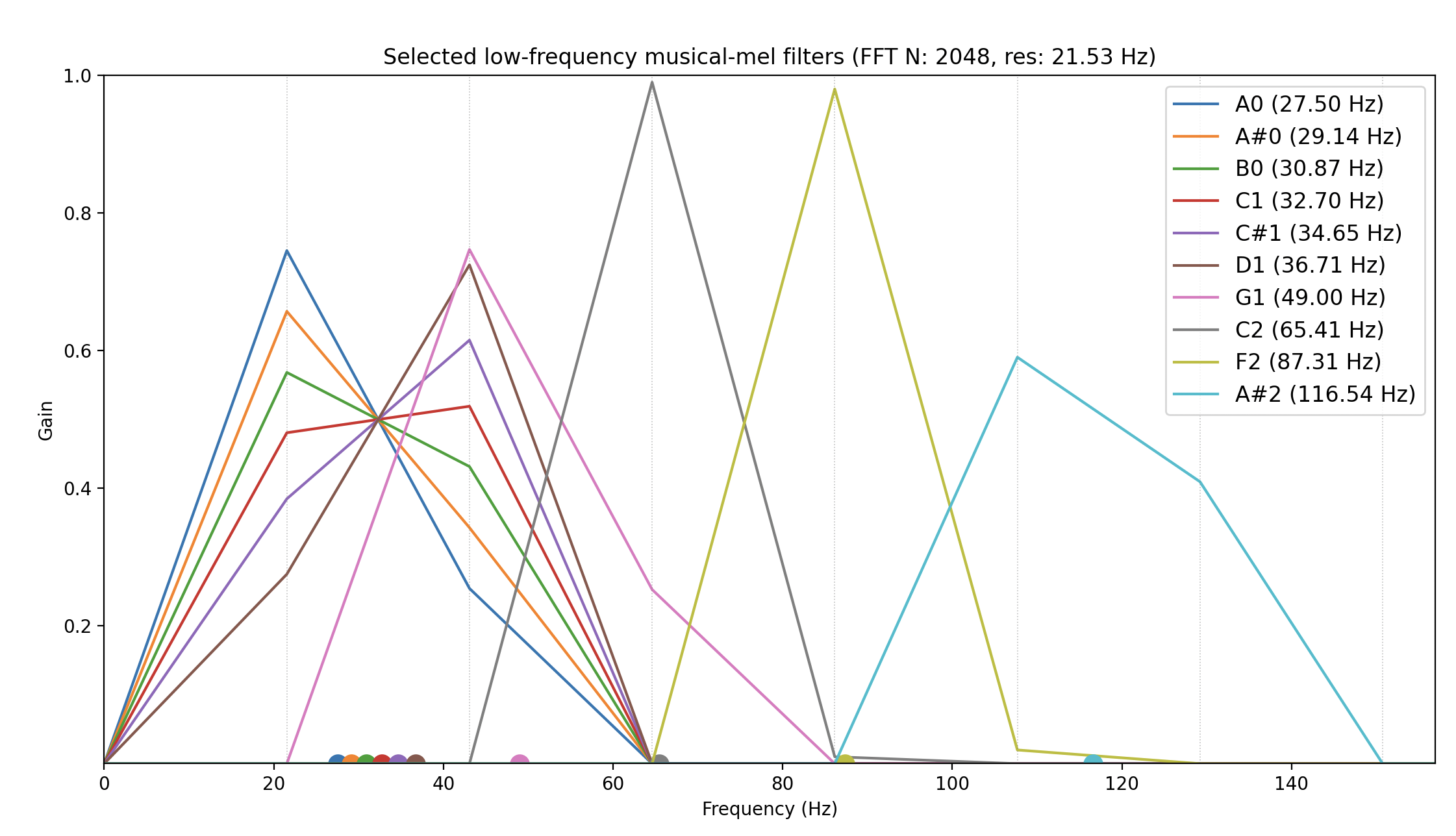
Low notes are impossibly close to each other, especially under 100hz, but that’s life (unless you can stomach the speed of a CQT transform). This package tries to cleverly interpolate FFT bins to mel pitch center bins in a way that lower frequencies are “discernable” from each other. But keep in mind we only have what the humble FFT offers us! We are just interpolating.
Contrast this to a normal FFT. The FFT linearly spaces features, so for the top frequencies end we end up with many, many features that aren’t as musically relevant.
To illustrate, let’s compare the resulting features for different transforms across different musically-relevant frequency ranges so we can see how different transforms vary:
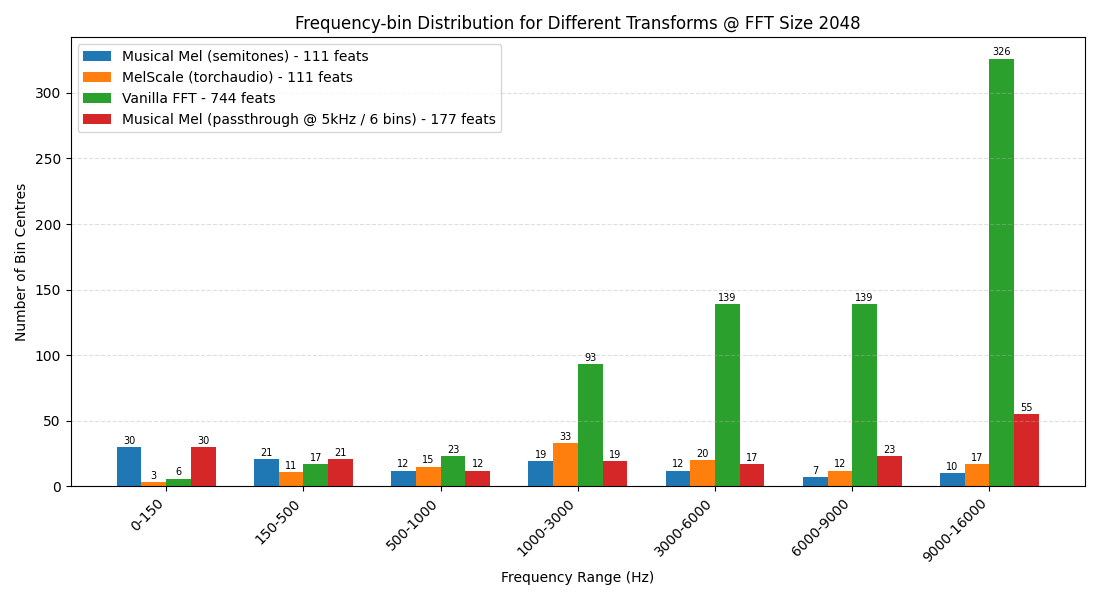
As you can see:
- The vanilla FFT has a huge number of features, most of which are on veryyy high frequencies >6khz, which is non-ideal
- Under 150hz, where low or sub-“bass” lives,
MusicalMelTransformsmoothly interpolates, giving a model better features to work with - Under 500hz, the
MusicalMelTransformstill has the best coverage – where most all the bass, root notes, and fundamental frequencies reside - For a transform with the exact number of features, torchaudio transform has ~1.5x as many features from 1khz and up
- But if we’re willing to spend a few more features, an optimized
MusicalMelTransformwith passthrough @ 5khz to let the FFT bins come through “covers” the torchaudio mel transform pretty much everywhere! So we can (except for the 1-3khz band) have our cake and eat it too.
⚠️ Warning of non-magic ⚠️
It’s important to remember all mel features are derivative of the FFT. If you’re working with a small FFT of, like 128 or whatever, this package won’t work miracles!
Your resolution on low end will still be crap.
I wouldn’t use this package below FFT size of 512, tbh. But by cleverly assigning and interpolating those FFT bins you do have, this package is a way to “stretch” the resolution you do have to make discrimination on the low end easier.
The main benefit is just namely that all the features you have are, by definition, musically relevant.
Characteristics of mel transforms, and some helpful tweaks to make
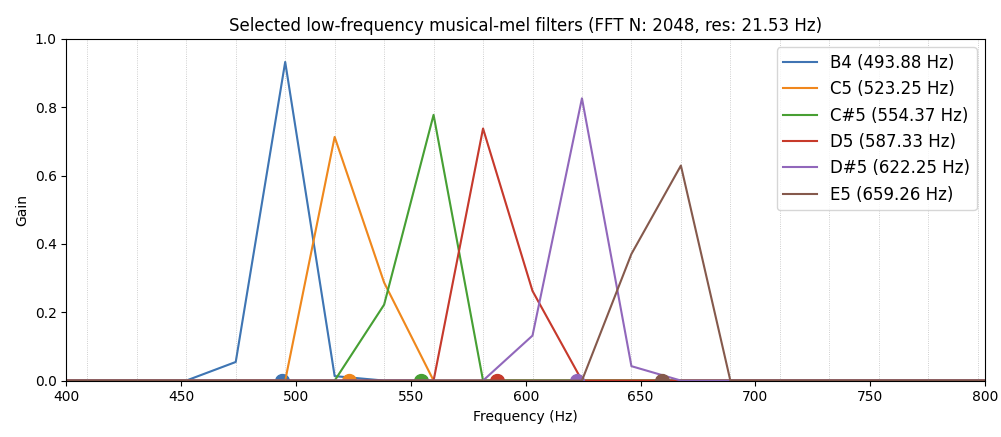
Here are some plots of mel bins (the x-axis dots + colored lines) as composed of FFT bin centers (the vertical grey lines) as we move up in frequency. We’ll talk through some implications.
If we zoom in to the first (very lowest) filters on MusicalMelTransform @ 2048 FFT size, 44.1khz you can see how related the lowest filters are. Because the FFT bins themselves are ~20hz apart, the mel bins below are just sliiightly different linear combinations of 2-3 low bins:
The situation, of course, gets much better as we move up in frequency to even 400-800Hz range:
And just as with any mel scale, once we get up to the really high frequencies (8th octave), the mels:
- Span multiple bins
- Ignore bins halfway between mel (pitch) centers
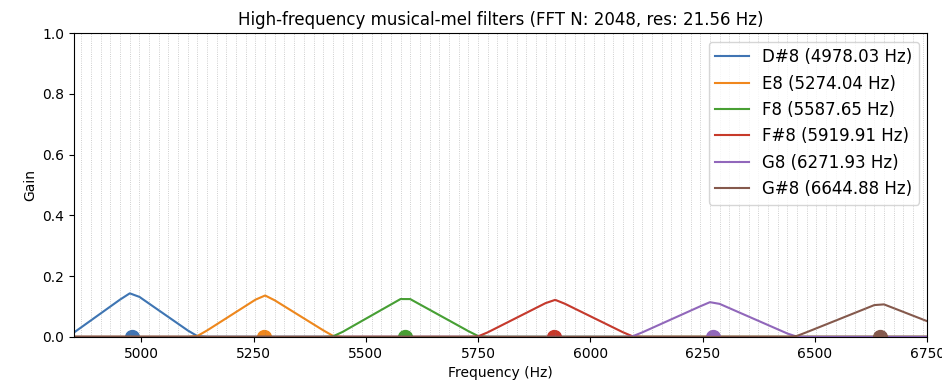
for reference, the top note on an 88-key piano is C8 – these frequencies are all above that! (unless you have a Bösendorfer)
These mostly-ignored bins between filters are usually fine, since at these high of frequencies we generally are hearing harmonics which are represented in a neighborhood around each other at harmonic intervals. So throwing out much of the contribution of a few bins is less important.
But as the frequencies continue the gaps get larger. And if some of that information is important (or you’d rather just pick an arbitrary point to have higher resolution than mels!), you can use MusicalMelTransform’s passthrough_cutoff_hz argument.
Here I show what happens using passthrough_cutoff_hz=5000 and passthrough_grouping_size=3. This effectively means, “after 5khz, don’t compute mel bins, just pass through the original FFT bins, grouping every 3 bins together”. This is the result:
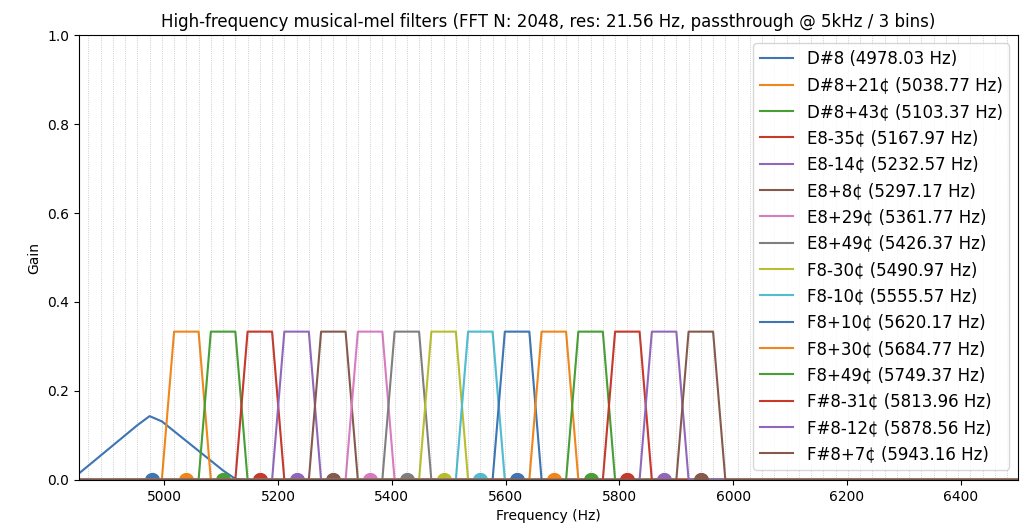
Here you can see that after 5khz, we start simply grouping every next three FFT bins into a mel bins. While it depends on your cutoff, generally the higher you have this passthrough_cutoff_hz, the larger your passthrough_grouping_size should be.
And of course these passthrough bins are no longer directly centered on musical notes.
Scaling & normalization
You will also notice that the magnitudes of each FFT bin going into the mel bins get much smaller than 1.0 as we climb frequencies. This is because pitches are spread across many more bins at high frequencies, and the plots have the norm=True parameter set, which normalized each filter to a total weight of 1.
Due to all this rescaling, I suggest using learnable_weights="fft" as this inserts a vector of learnable parameters that helps you scale the original FFT magnitudes (or power, depending on your setting for power) for your usecase. You probably want to have norm=False in this case.
Otherwise the MusicalMelTransform has no learnable weights.
Don’t ignore the bitter lesson
At some point we should be careful – the temptation to ignore The Bitter Lesson by constantly tweaking the f_max, passthrough_cutoff_hz, passthrough_grouping_size, norm, etc with your transform to make your network perform better is a real temptation.
At some point we just need the information to flow through to a reasonable network that will learn from it.
While I do think the Bitter Lesson applies less in a realtime or resource constrained scenario, do think your your architecture and data through before spending your days tweaking your mel transform settings.
The gainz you seek are in the former, not the latter.
Summary
Again, to reiterate: a mel transform is not magic! It is a series of linear combinations on the original FFT bins.
But if you’re clever about it, it really does help!
Check out the repo here, make a PR, and write about any issues if you see them!
About VJLab.AI
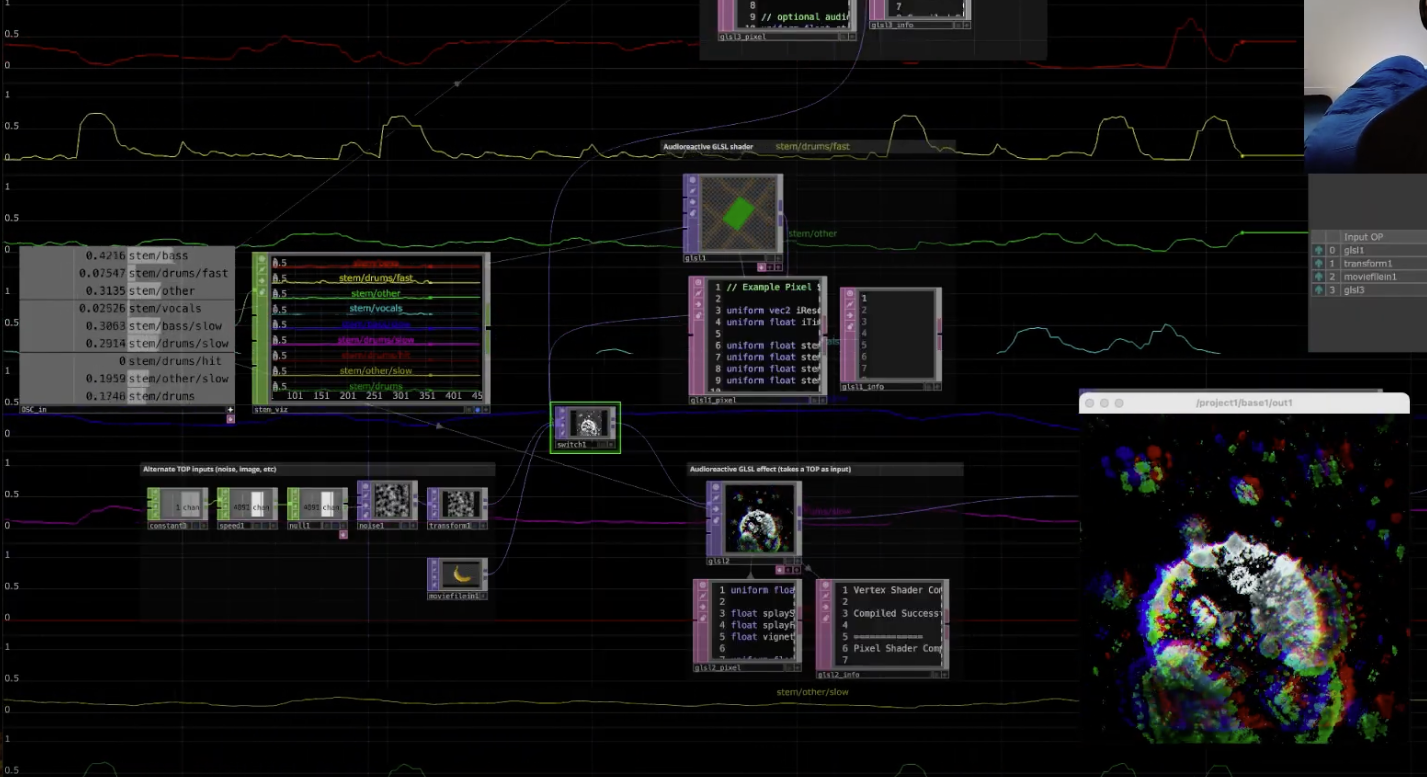
If you’re curious to learn more about what kinds of things we’re doing at VJLab.AI with all this stuff, check out:
- A video showcasing our tool, AudioSlice that I have personally used to peform visuals for acts like John Summit, Dom Dolla, Gorgon City, Benny Benassi, GriZ and many more
- Our beat tracker, BeatSage, for live concert VJs
To stay up to date with what we’re doing:
- You can follow my YouTube account for tutorials
- or Instagram for tutorials and teasers
- Or our new email list for updates on new tools, models, repos, and updates to our existing apps
Our next generation of realtime audio models for visual artists and live performers are coming soon :)